How a field-first approach helped teams capture real work without disruption, cutting admin effort by 35% and driving 40% higher employee adoption across mobile and web workflows.
View design decisions
⏳
2 months discovery & exploration
4 months design alignment
🖥️
Mobile (employee)
Web (admin)

Design decisions that changed how work is captured and what the business can trust.
+ 40%
Field Adoption
- 35%
Admin Overhead
Reduction in admin reconciliation effort
+ 50%
Processing Time
- 45%
Missing Entries
Time data captured correctly by default
BuildOps = Work Capture + Operational Confidence
time, service calls, job context
validation, states, auditability
To identify usability gaps and system inefficiencies, the existing platform was evaluated using established usability heuristics. This helped uncover issues affecting clarity, efficiency, and reliability across both employee and admin workflows.
The evaluation revealed several critical problems, including unclear action hierarchy, lack of error prevention, limited reporting flexibility, and inconsistent interaction patterns. These issues created friction in daily operations and reduced trust in the system.
Insights from this evaluation helped prioritize design improvements and guided the restructuring of workflows to create a more intuitive and reliable experience.

Research insights were translated into a structured list of system requirements defining the key features needed across reporting, projects, timesheets, and service management to support both operational tasks and administrative oversight.
Miscellaneous
Features
Login screens
Error message lightbox
Tooltips
Onboarding (Demo) screens
Employee
Admin
Calendar
Features
Employee
Admin
View scheduled projects
Service Call
Features
Add/edit new service call
View
Employee
Admin
Timesheets
Employee
Admin
Add & edit time
View/ edit existing reports
Location tracking
Sign-in/off
Alerts & notifications
Features
Projects
Features
Ability to create new Projects
Manage tasks
Search & filter
View project details
Alerts & notifications
Employee
Admin
Report
Features
View and export
Search and filter
Manage timesheets
View alerts & notifications
Employee
Admin
Field teams and office teams experience work very differently, BuildOps connects them.





We evaluated leading workforce and project management tools to understand feature gaps, overlaps, and opportunities. This analysis helped identify where BuildOps could differentiate by combining operational visibility with real-time team coordination.


Every feature exists to solve a specific breakdown, not to add complexity.
Each quadrant represents a real breakdown we observed.

These tensions made it clear that a shared UI would fail.
“The system needed explicit ownership of truth at every step.”
Early ideas were explored through low-fidelity wireframes to quickly test layout structures, information hierarchy, and workflow direction. This stage allowed rapid iteration before moving into more detailed digital designs.
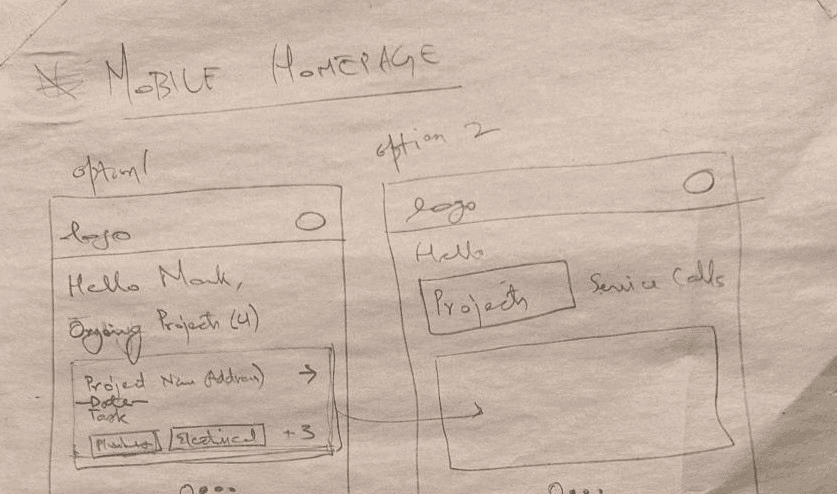


The initial wireframes were refined into mid-fidelity designs to establish clearer layouts, interaction flows, and content structure. This stage focused on validating usability and ensuring the system supported key workflows effectively.


How work moves from field capture to operational approval


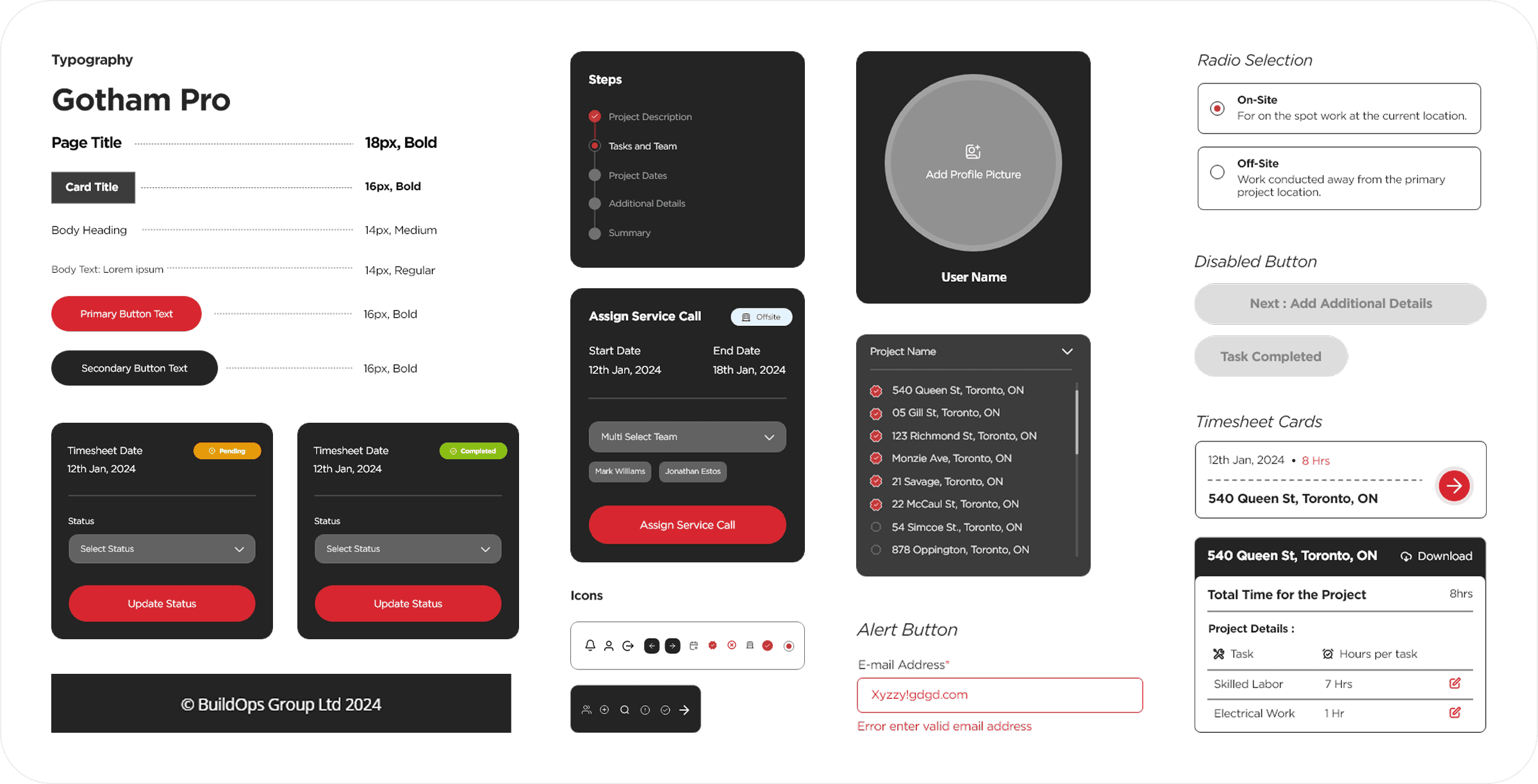
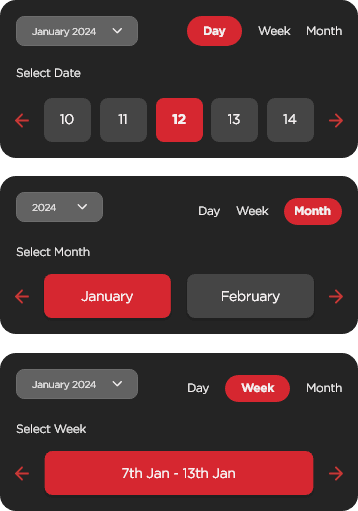
The style guide establishes a scalable design foundation that ensures visual consistency, accessibility, and cross-platform coherence.
It defines typography, color logic, spacing principles, and component behavior within a unified system. Each element is structured to maintain hierarchy, clarity, and predictable interactions across mobile and desktop.
By standardizing visual and interaction patterns, the system reduces design debt, accelerates development, and supports future scalability without compromising usability.
01


02



03


04

05


The interface was guided by core usability heuristics to ensure clarity, efficiency, and reliability across workflows.
Enable logging without breaking physical or cognitive flow.
01

Make work state and progress visible at a glance.
02
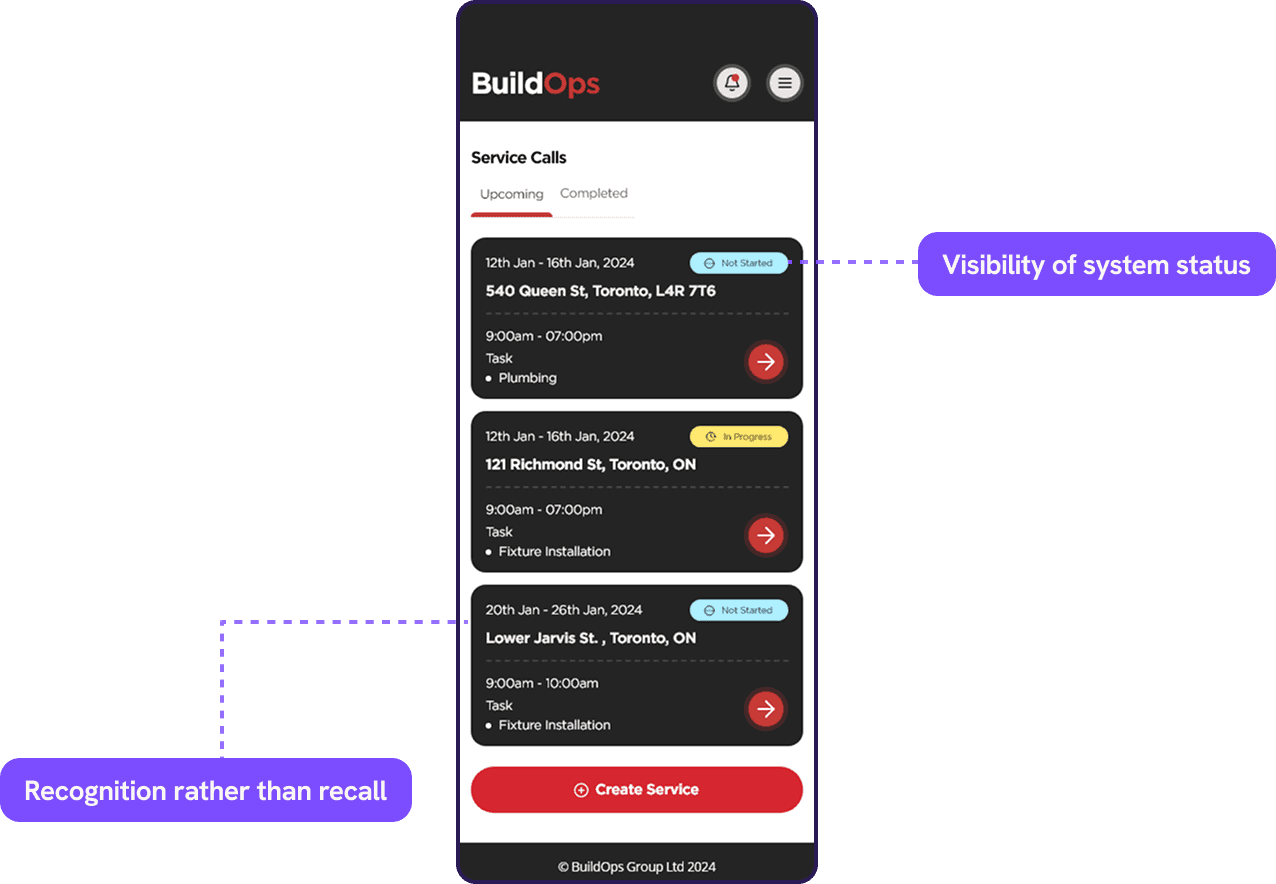
Remove the need to remember steps, codes, or sequences.
03

Ensure logged work resolves into clean, reliable records by default.
04

Make it obvious what happens after submission and what’s actionable.
05

Give admins a single source of truth without manual reconciliation.
06

Service calls are the system’s point of truth. This phase focuses on capturing work at the moment it happens, minimizing recall, and aligning field execution with operational oversight.
Phase 1
Employee
Employees receive assigned service calls, track progress in real time, and log time, tasks, and notes as work occurs. The interface is optimized for speed and clarity so that documentation does not interrupt execution.
Admin
Admins gain immediate visibility into active and completed service calls. Work status, duration, and task details are visible without requiring follow-ups, enabling early intervention when delays or exceptions occur.
View and Create Service Calls

Phase 2
Timesheets are treated as a resolution layer, not a data-entry task.
This phase demonstrates how previously captured work flows naturally into payroll-ready time records.
Employee
Timesheets are pre-populated from service calls and task activity. Employees review, adjust and submit without reconstructing their day.

Admin
Admins review consolidated time entries with clear traceability back to service calls. Exceptions are surfaced explicitly, reducing manual audits and approval cycles.
Phase 3
Projects provide structure and accountability by aggregating work already performed. This phase shows how execution data rolls up into progress, cost, and performance visibility.
Employee
Employees view assigned project tasks and understand how their service work contributes to larger goals, without needing to manage project complexity.
Admin
Admins monitor project health through real-time progress, time allocation, and cost signals derived directly from service and timesheet data.
Across these phases, the system evolves from rough, in-the-moment capture to a stable operational backbone. Each iteration tightens the loop between field reality and admin oversight, reducing interpretation, rework, and delays. What begins as hand-drawn intent becomes a set of role-aware flows that respect time, context, and accountability so work is recorded once, trusted everywhere, and acted on without friction. This progression reflects not just visual maturity, but a deliberate shift from managing inputs to enabling outcomes.

UX annotations were delivered as a companion artifact to the designs, documenting interaction logic, state behavior, edge cases, and system dependencies.
They translate visual decisions into implementable guidance, ensuring consistency across platforms and clarity for engineering, product, and QA.
This allowed the team to move faster during build while preserving design intent and reducing interpretation gaps.


“This project shaped how I approach operational products where accuracy, adoption, and trust are equally critical.”
This project reinforced a core belief in my design approach: real impact comes from designing for behavior, not just screens.
In a field-heavy environment like BuildOps, every extra step adds resistance. By aligning workflows with how teams already work across devices, roles, and contexts we were able to simplify complexity without removing necessary control.
The result was not just a better interface, but a system teams could trust, adopt, and rely on every day.